|
1
|
- Jonathan D. Melvin
- Vision Implementers, Inc., jdm@vi-i.com
- LA CSharp, October 15, 2002
- Based in part on a talk given at Caltech, April 16, 2001
|
|
2
|
- Allow a system to be created and run
- simply by specifying:
- data structures
- work flow
|
|
3
|
- Not yet possible to eliminate all programming, but…
- Programming of the user interface is greatly simplified by using the web
browser
- Much of the user interface is specified via naming conventions in the
data
- Most of the code is in a framework which accesses simple scripts to
present the user interface (setup framework) and work flow screens
(application framework)
|
|
4
|
- Screen layout is largely carried out by the browser (e.g., you can tell
the browser “start table”, “start row”, “start cell”, <contents>,
“end cell”, … instead of having to specify the detailed layout of the
table)
- Secure internet communication (SSL) is included "for free"
- Any kind of client machine can be used (PC, Mac, Sun, …)
|
|
5
|
- Code changes can be instantly deployed at a single location for all
users
- Users can work from anywhere; support personnel can fix problems from
anywhere
- The system can communicate with email, fax, cell phones, etc. without
special programming
- The system can incorporate address validation, geographical mapping, and
other services available for free on the Internet
|
|
6
|
- More rapid system implementation
- Simpler system maintenance
- Consistent user interface
|
|
7
|
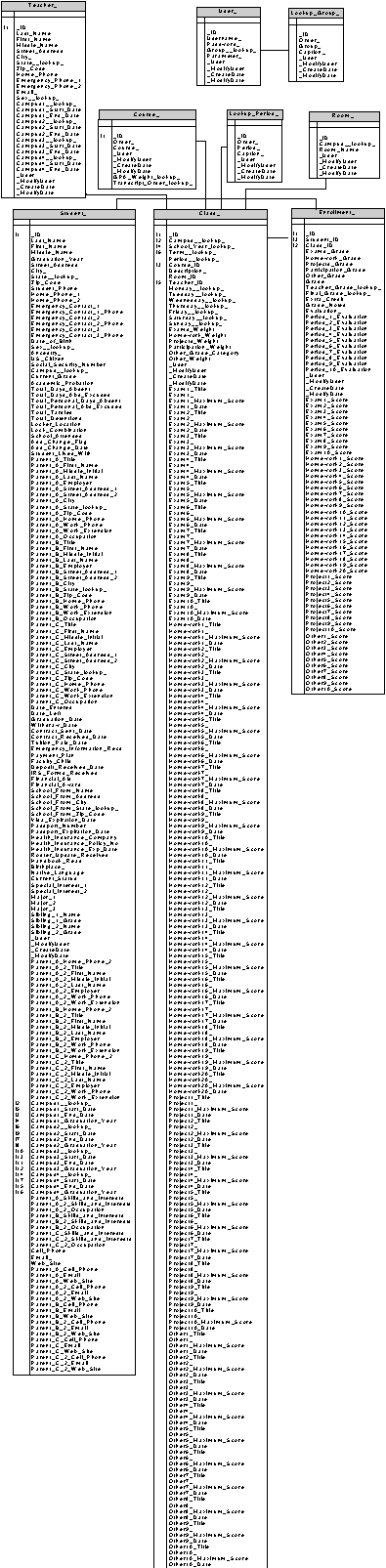
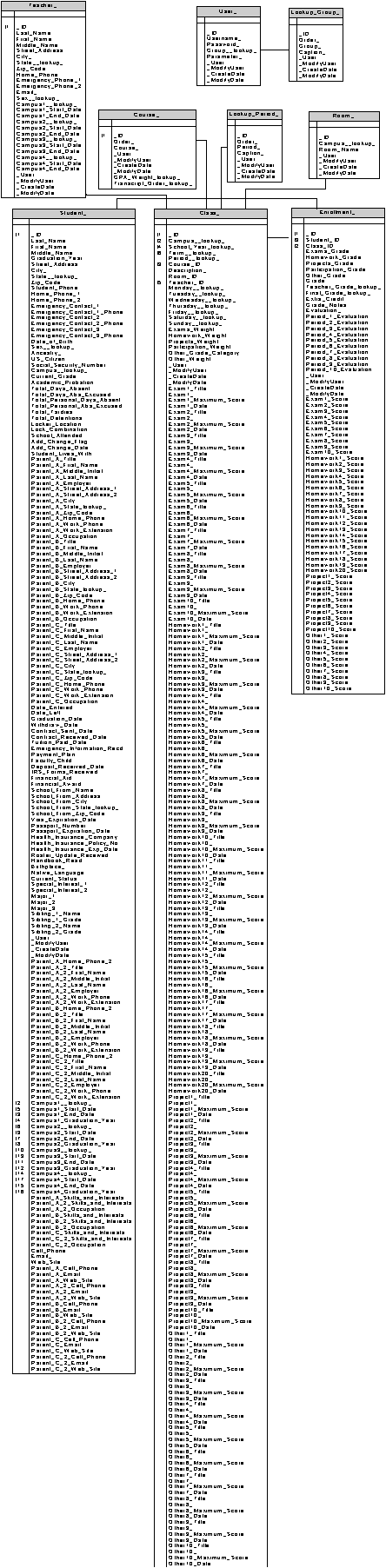
- A setup framework executes scripts which describe the database using
descriptive names for types of data elements. The framework creates the tables in a
SQL database. A sample script
excerpt follows:
- . . .
- Create Table "Teacher_",+_
- "Last_Name Name,"+_
- "First_Name Name,"+_
- "Middle_Name Name,"+_
- "Street_Address1
Long,"+_
- "City_ Long,"+_
- "State__lookup_ 2char,"+_
- "Zip_Code ID,"+_
- . . .
|
|
8
|
|
|
9
|
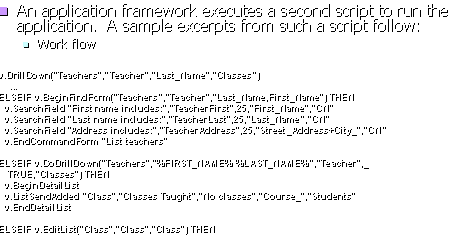
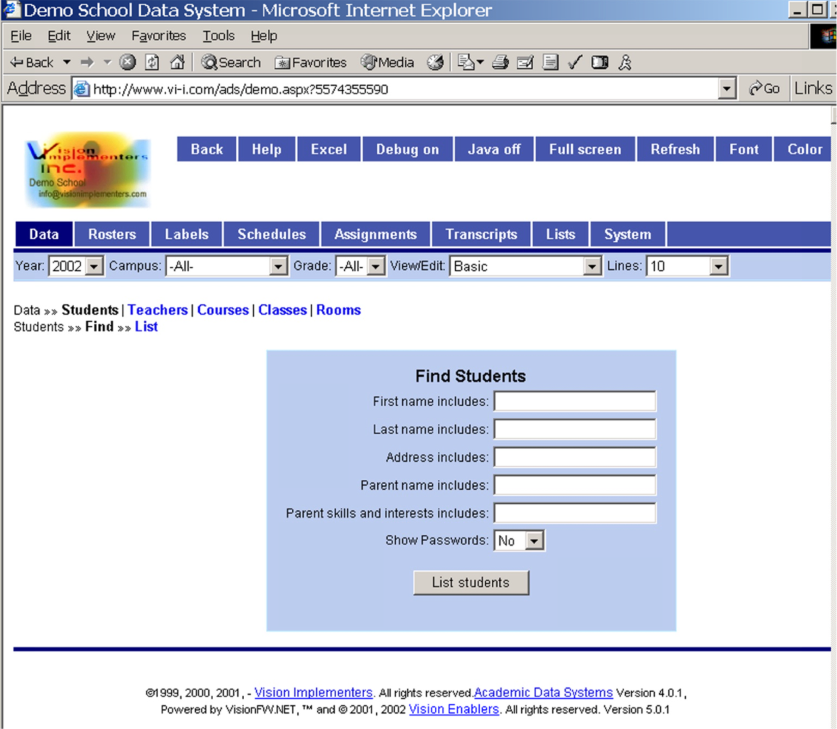
- An application framework executes a second script to run the
application. A sample excerpts
from such a script follow:
- v.DrillDown("Teachers","Teacher","Last_Name","Classes“)
- ...
- ELSEIF
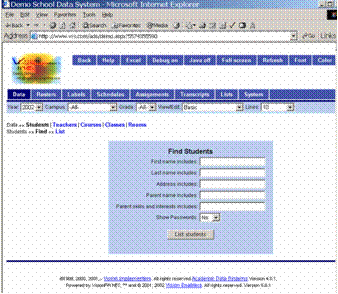
v.BeginFindForm("Teachers","Teacher","Last_Name,First_Name")
THEN
- v.SearchField "First name
includes:","TeacherFirst",25,"First_Name","CN"
- v.SearchField "Last name
includes:","TeacherLast",25,"Last_Name","CN"
- v.SearchField "Address
includes:","TeacherAddress",25,"Street_Address+City_","CN“
- v.EndCommandForm "List
teachers"
- ELSEIF v.DoDrillDown("Teachers","%FIRST_NAME%
%LAST_NAME%","Teacher",_
- TRUE,"Classes") THEN
- v.BeginDetailList
- v.ListSendAdded
"Class","Classes Taught","No
classes","Course_","Students"
- v.EndDetailList
- ELSEIF v.EditList("Class","Class","Class")
THEN
|
|
10
|
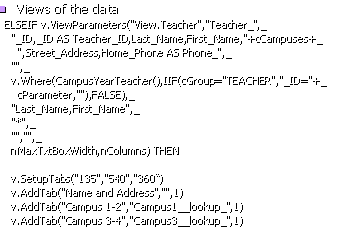
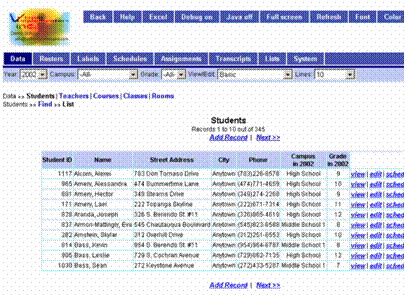
- Views of the data
- ELSEIF
v.ViewParameters("View.Teacher","Teacher_",_
- "_ID,_ID AS
Teacher_ID,Last_Name,First_Name,"+cCampuses+_
-
",Street_Address,Home_Phone AS Phone_",_
- "",_
-
v.Where(CampusYearTeacher(),IIF(cGroup="TEACHER","_ID="+_
-
cParameter,""),FALSE),_
-
"Last_Name,First_Name",_
- "*",_
- "","",_
- nMaxTxtBoxWidth,nColumns) THEN
-
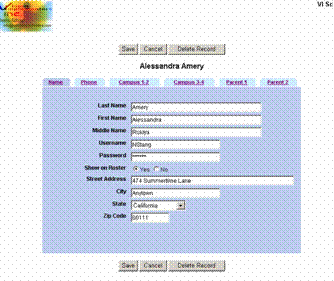
v.SetupTabs("135","540","360“)
- v.AddTab("Name and
Address","",1)
- v.AddTab("Campus
1-2","Campus1__lookup_",1)
- v.AddTab("Campus
3-4","Campus3__lookup_",1)
|
|
11
|
|
|
12
|
|
|
13
|
|
|
14
|
- Login with username and password
- Membership of each user in a user group which controls access to entire
tables, to columns and rows within tables, as to parts of the work flow
- Consistent work flow navigation structured as follows:
- User picks a step in the work flow
- User views a list of work that is at that step
- User selects an items on that list and carries out work. Work
can involve entering new data and/or changing the step in the
work flow for the item.
|
|
15
|
- Text, and numerical, date, and choice input
- Rapid data entry of multiple values for a set of data records
(spreadsheet style input)
- Entry and deletion of records corresponding to entries in a standard
list (e.g., inventory values for a list of items for a particular month)
- Formatted reports and forms
- Import and export data from other systems
|
|
16
|
- Data in a “database” is organized into “tables” (rows and columns). Each row is called a “record”. Each column value in a row is called a
“field”.
- A field value can be
- A number
- Text (of limited and of unlimited size)
- Graphics or other external data
- A date
- A pointer to a record in another table ("foreign key")
|
|
17
|
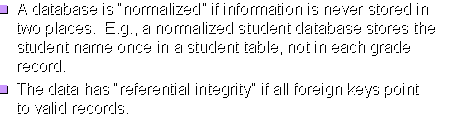
- A database is “normalized” if information is never stored in two
places. E.g., a normalized
student database stores the student name once in a student table, not in
each grade record.
- The data has “referential integrity” if all foreign keys point to valid
records.
|
|
18
|
- "SQL", or “Structured Query Language”, is a syntax for
specifying in an almost English manner what is to be done to data. Examples:
- SELECT * FROM Student WHERE LEFT(Last_Name,1)=’M’
- UPDATE Grade SET Grade.Final=’A’ FROM Grade LEFT JOIN STUDENT ON
Grade.Student_ID=Student.ID WHERE Student.Major=’Physics’
|
|
19
|
- “Tracking fields” are extra fields which record who created and who
modified the record and when, version number for the record, and/or
other such information relating to the use of the database (as opposed
to the data in the database)
|
|
20
|
- Supports normalized databases, enforces referential integrity, and
incorporates tracking fields
- Uses SQL to standardize interaction with the database and to concisely
specify data views (and through them control appearance of data on the
screen)
|
|
21
|
- Framework implements user interface and data access structures
- Concise scripts (code) implement specifics of the design
- Data structure
- Work flow
- Queries, overview columns, and fields on detailed single record
edit/view screens
|
|
22
|
- Active Server Page script language (VBScript) on Microsoft IIS Servers
- ODBC access to SQL databases, usually in SQLServer, but can also use
FoxPro, Access, Excel, etc.
- All systems are implemented in a single ASP page; session (persistent
state) variables are used to track where one is in the work flow (what
part of the page will be executed next)
|
|
23
|
- Conversion of the framework to a single VB class
- The application-specific script instantiates the framework and
application objects and calls a method which creates the page
|
|
24
|
- The framework is preserved
- All the code has been converted to .NET (VB.NET)
- The code is compiled into DLLs
- A single line aspx (ASP.NET) file instantiates the application object
which creates the web page based on the session (state) and form (user
input) values
- The code is object oriented, with a specific application object, a
generic application object, an application template superclass, and the
framework class
|
|
25
|
- Used a combination of manual and automatic tools used to convert 30,000
lines of code in a few weeks
- Made some VBScript syntax manual code changes
- Public variables were converted to properties of objects
- StringBuilder object was used to rapidly assemble the web page
|
|
26
|
- All continued code lines must end in <space>_ (an space must
precede the underscore)
- All procedures must be called as if functions:
- xyx(a,b,c) (not xyz a b c).
- All variables must be declared before use
- Preferred: All variables, parameters, and functions should be typed
(e.g., DIM I AS Integer). This
causes the code to execute much faster.
- Instead of declaring public variables that are global to all the code,
make variables public properties of objects that are instantiated and
call them as such, e.g., nDefaultIncrement becomes v.nDefaultIncrement.
- Added after evaluations of fields oRS(“…<field name>…”) the
explicit property specification .Value.,
e.g.:
- oRS(“ID”).Value (not oRS(“ID”))
- Recast the code into vb code modules as described on next slides
|
|
27
|
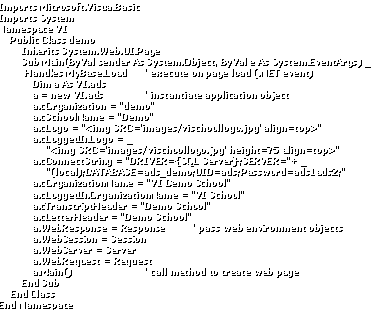
- Imports Microsoft.VisualBasic
- Imports System
- Namespace VI
- Public Class demo
- Inherits
System.Web.UI.Page
- Sub Main(ByVal sender As
System.Object, ByVal e As System.EventArgs) _
- Handles MyBase.Load ' execute
on page load (.NET event)
- Dim a As VI.ads
- a = new VI.ads '
instantiate application object
- a.cOrganization =
"demo"
- a.cSchoolName =
"Demo"
- a.cLogo =
"<img SRC='images/vischoollogo.jpg' align=top>"
- a.cLoggedInLogo = _
- "<img SRC='images/vischoollogo.jpg' height=75
align=top>"
- a.cConnectString =
"DRIVER={SQL Server};SERVER="+ _
- "(local);DATABASE=ads_demo;UID=ads;Password=ads1ads2;"
- a.cOrganizationName =
"VI Demo School"
-
a.cLoggedInOrganizationName = "VI School"
- a.cTranscriptHeader =
"Demo School"
- a.cLetterHeader =
"Demo School"
- a.WebResponse =
Response ' pass web environment objects
- a.WebSession = Session
- a.WebServer = Server
- a.WebRequest = Request
- a.Main() ' call
method to create web page
- End Sub
- End Class
- End Namespace
|
|
28
|
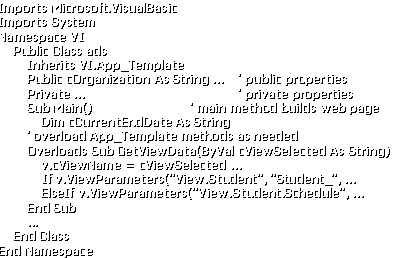
- Imports Microsoft.VisualBasic
- Imports System
- Namespace VI
- Public Class ads
- Inherits VI.App_Template
- Public cOrganization As
String ... ' public properties
- Private ... ' private
properties
- Sub Main() ' main method
builds web page
- Dim cCurrentEndDate As
String
- ' overload App_Template
methods as needed
- Overloads Sub
GetViewData(ByVal cViewSelected As String)
- v.cViewName =
cViewSelected …
- If
v.ViewParameters("View.Student", "Student_", ...
- ElseIf
v.ViewParameters("View.Student.Schedule", ...
- End Sub
- ...
- End Class
- End Namespace
|
|
29
|
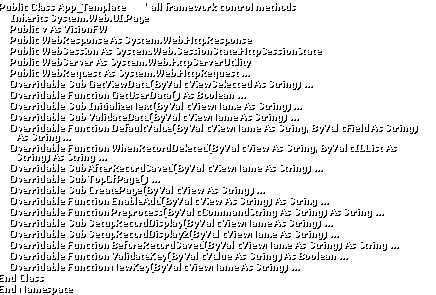
- Public Class App_Template ' all framework control methods
- Inherits System.Web.UI.Page
- Public v As VisionFW
- Public WebResponse As
System.Web.HttpResponse
- Public WebSession As
System.Web.SessionState.HttpSessionState
- Public WebServer As
System.Web.HttpServerUtility
- Public WebRequest As
System.Web.HttpRequest ...
- Overridable Sub
GetViewData(ByVal cViewSelected As String) ...
- Overridable Function
GetUserData() As Boolean ...
- Overridable Sub
InitializeNext(ByVal cViewName As String) ...
- Overridable Sub
ValidateData(ByVal cViewName As String) ...
- Overridable Function
DefaultValue(ByVal cViewName As String, ByVal cField As String) As
String ...
- Overridable Function
WhenRecordDeleted(ByVal cView As String, ByVal cIDList As String) As
String ...
- Overridable Sub
AfterRecordSaved(ByVal cViewName As String) ...
- Overridable Sub TopOfPage()
...
- Overridable Sub
CreatePage(ByVal cView As String) ...
- Overridable Function
EnableAdd(ByVal cView As String) As String ...
- Overridable Function
Preprocess(ByVal cCommandString As String) As String ...
- Overridable Sub
SetupRecordDisplay(ByVal cViewName As String) ...
- Overridable Sub
SetupRecordDisplay2(ByVal cViewName As String) ...
- Overridable Function
BeforeRecordSaved(ByVal cViewName As String) As String ...
- Overridable Function
ValidateKey(ByVal cValue As String) As Boolean ...
- Overridable Function
NewKey(ByVal cViewName As String) ...
- End Class
- End Namespace
|
|
30
|
- Imports Microsoft.VisualBasic
- Imports System
- Namespace VI
- Public Class VisionFW
- Inherits System.Web.UI.Page
- public ... ' public
properties
- private ... ' private
properties
- Sub Initialize() ' the
methods
- ...
- End Class
|
|
31
|
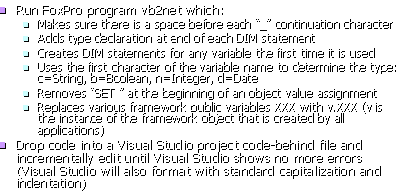
- Run FoxPro program vb2net which:
- Makes sure there is a space before each “_” continuation character
- Adds type declaration at end of each DIM statement
- Creates DIM statements for any variable the first time it is used
- Uses the first character of the variable name to determine the type:
c=String, b=Boolean, n=Integer, d=Date
- Removes “SET ” at the beginning of an object value assignment
- Replaces various framework public variables XXX with v.XXX (v is the
instance of the framework object that is created by all applications)
- Drop code into a Visual Studio project code-behind file and
incrementally edit until Visual Studio shows no more errors (Visual
Studio will also format with standard capitalization and indentation)
|
|
32
|
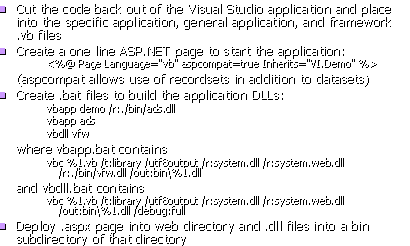
- Cut the code back out of the Visual Studio application and place into
the specific application, general application, and framework .vb files
- Create a one line ASP.NET page to start the application:
- <%@ Page Language="vb" aspcompat=true
Inherits="VI.Demo" %>
- (aspcompat allows use of recordsets in addition to datasets)
- Create .bat files to build the application DLLs:
- vbapp demo /r:./bin/ads.dll
- vbapp ads
- vbdll vfw
- where vbapp.bat contains
- vbc %1.vb /t:library /utf8output /r:system.dll /r:system.web.dll
/r:./bin/vfw.dll /out:bin\%1.dll
- and vbdll.bat contains
- vbc %1.vb /t:library /utf8output /r:system.dll /r:system.web.dll
/out:bin\%1.dll /debug:full
- Deploy .aspx page into web directory and .dll files into a bin
subdirectory of that directory
|
|
33
|
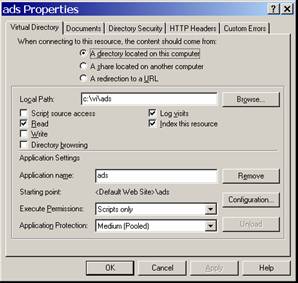
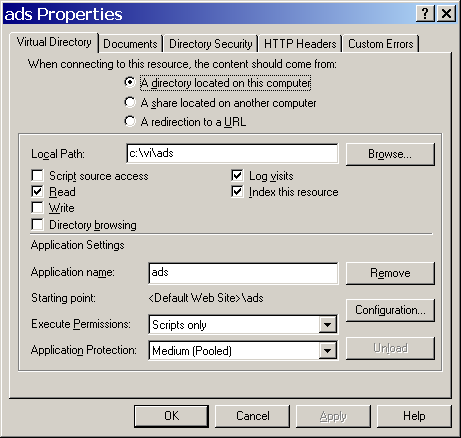
- Make sure
- that the IIS
- properties of
- the application
- directory have
- an application
- created
- à
- And of course
- the server must
- have the .NET
- Framework
- loaded
|
|
34
|
- An remote environmental monitoring system
- Gas station monitoring (old ASP system)
- Restaurant monitoring
- An academic data system
|

 Notes
Notes